Removal tool for ESET programs
ESET Uninstaller is a free utility tool for PC developed by ESET North America. As its name suggests, this uninstaller was made specifically to help users that are having some issues uninstalling ESET programs from their computers. It will automatically detect these types of software and will manually remove them all.
ESET Uninstaller will be able to help with removing software like ESET NODE32 Antivirus or ESET Internet Security if uninstalling them through normal methods does not work. The whole process will be done via the command terminal, with instructions and explanations to guide users along the way.
How does it work exactly?
ESET is an internet security company known for its antivirus and security software like Internet Security and NODE32 Antivirus. However, not all users prefer them and will opt to uninstall them to use other solutions. There have been instances when they could not be removed through normal uninstallation methods, and this is where the ESET Uninstaller utility comes in to help users who have encountered this situation.
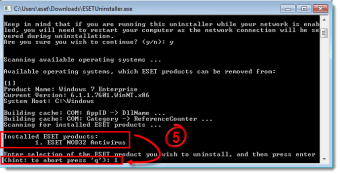
This uninstaller is a small utility and will run from your command terminal when you first launch it. Follow the prompts, and it will then scan your PC for any installed ESET software. From there, choose which ones you want to remove by typing in their corresponding number on the list. Wait for it to finish the process and restart your PC to check if the procedure was successful.
A couple of things to note before you begin. The first is that this tool will only work in Safe Mode. The other is that using it may result in your Windows network settings being deleted afterward, so it would be a good idea to make a backup beforehand. Aside from these two things, using this utility is relatively straightforward and won't take long to finish.
When all else fails
In conclusion, if you've ever experienced issues while trying to uninstall ESET program on your PC, give ESET Uninstaller a try to see if it can help you. The tool itself is lightweight and the whole process doesn't take a lot of time to finish. Just take note of the two important things mentioned above, and you'll be good to go.

.png)